Getting started
Departments and locations
Organise people into departments and work locations, choose the head office and pin each location on a map for attendance.
For: Owners and HR
Departments
Open People › Departments. Departments can sit under other departments (Finance › Payroll). Each has a name, an optional cost-centre code, a head and a description.
Locations
Open People › Locations to add offices, branches, shops or sites. Tick This is the head office on one of them: it is your main address for filing.
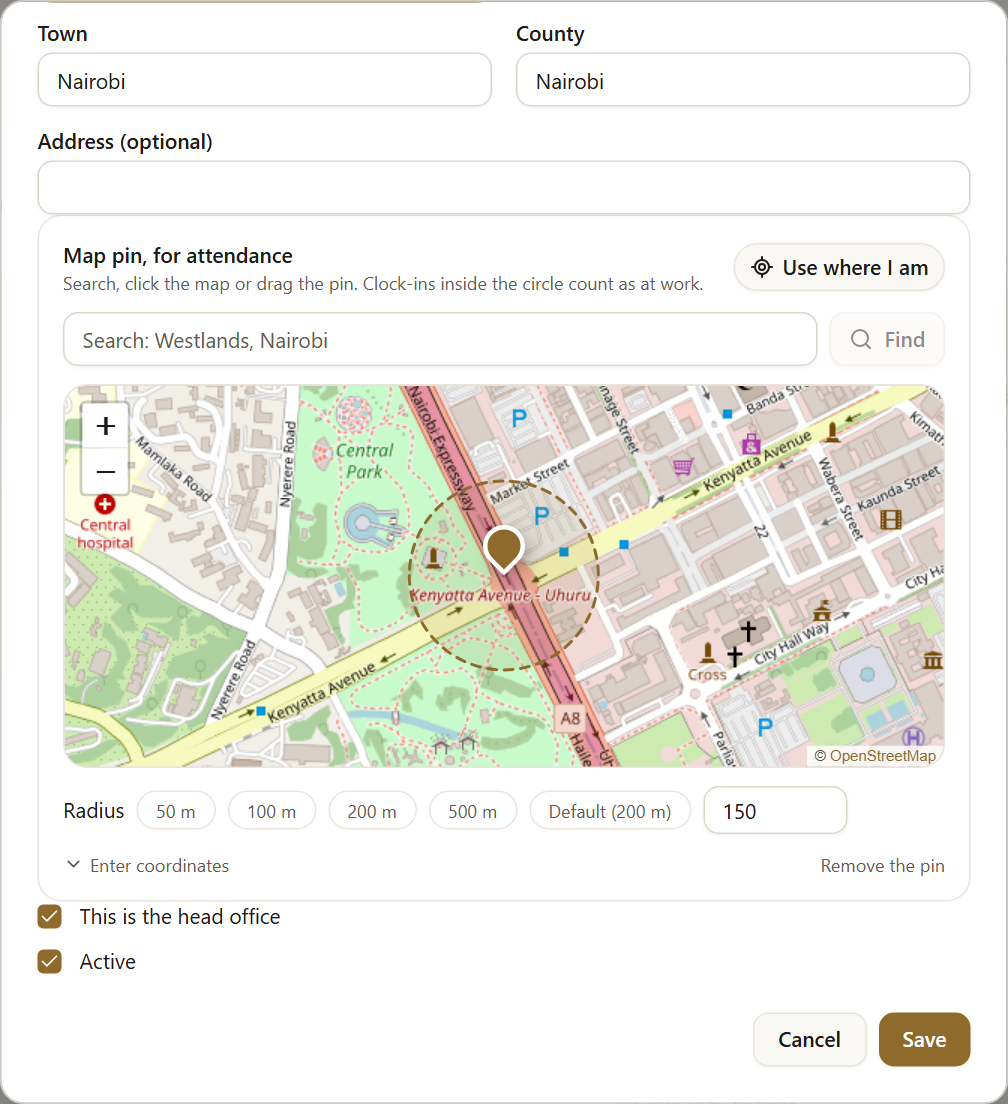
Pin a location on the map
If you use attendance, each location needs a map pin. Clock-ins inside its circle count as being at work.
- Open the location and find Map pin, for attendance.
- Search an address (for example “Westlands, Nairobi”) and press Find, click the map where the office is, or tap Use where I am while you are there.
- Drag the pin until it sits on the building.
- Pick a radius: 50, 100, 200 or 500 m, or type your own. The circle shows what counts as at work.
- Save.